How to Use Claude Code Subagents (Complete Guide 2026)
Claude Code subagents let you parallelize research, isolate risky changes in worktrees, and delegate background work — here's exactly how to use them and when they're worth it.
Claude Code can spawn subagents — separate Claude instances that run tasks independently from your main session. I've used them to parallelize codebase research, isolate large refactors in git worktrees, and run background checks while staying focused on whatever I was building. This guide covers what subagents actually do, how to use them, and the patterns worth knowing.
What Are Claude Code Subagents?
When you open Claude Code in a terminal, you're talking to a single Claude instance with access to tools like Bash, Read, Edit, and WebFetch. That instance handles one task at a time in a linear conversation.
A subagent is a second Claude instance that your main session spawns to handle a specific piece of work. The main session delegates a task, the subagent runs it in isolation, and the result comes back as a message. The subagent gets its own tool access, its own context window, and — if you specify — its own isolated copy of the repo on a separate branch.
Three things make subagents genuinely useful rather than just a novelty:
- Parallelism — the main session can fire off multiple subagents simultaneously and continue other work while they run
- Isolation — a subagent in a worktree makes changes without touching your working tree; if it breaks something, you discard the worktree
- Specialization — different subagent types have different tool sets, so you can route tasks to whichever agent fits best
Note
Subagents are available in Claude Code as of early 2026. The core API is stable, but specific subagent types and parameters may evolve across releases. Check CLAUDE.md or the release notes if something here doesn't match what you see.
The 3 Main Use Cases
Parallel Research
You're building a feature and need to: understand how three authentication libraries handle token refresh, find all the places in your codebase that currently touch session state, and check the relevant Next.js docs. In a single-agent session, you do these sequentially. With subagents, you can spawn three and let them run simultaneously.
This pays off when each subtask takes 30+ seconds. For quick lookups, the spawning overhead isn't worth it — just ask Claude directly.
Isolated Refactors
You want to try migrating a significant chunk of code — say, moving from one state management library to another — but you don't want to contaminate your working tree while you're still shipping features on main.
A subagent with isolation: "worktree" gets a clean copy of your repo on a fresh branch. It makes all its changes there. You review the diff and merge or discard. Your working tree is untouched throughout.
I've used this for refactors I wasn't sure would work out. Spin up a worktree subagent, look at the resulting diff, decide whether it's worth pursuing. If not, throw the worktree away. No git reset, no stashing, no cleanup.
Background Tasks
You're writing a component. You want TypeScript errors checked in the adjacent directory, test stubs drafted for the code you're writing, and docs updated — all while you focus. You kick off background subagents for each and get notified when they finish.
How to Spawn a Subagent
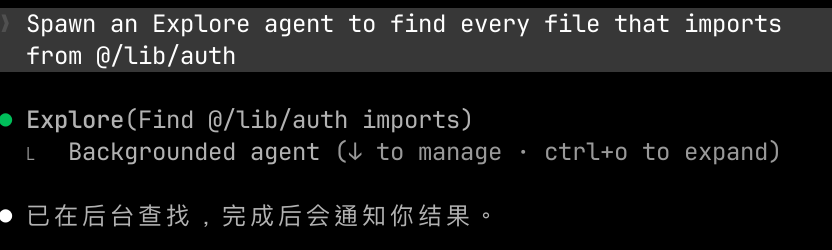
You don't call the Agent tool directly — you ask Claude Code to delegate a task, and it handles the tooling. The most direct approach:
Spawn an Explore agent to find every file that imports from @/lib/auth
Or more naturally:
Use a subagent to figure out how our session token refresh works —
I'll keep working on the route handler while it runs in background
Claude will invoke the Agent tool with your task and return the result when the subagent finishes.
What Gets Passed to the Subagent
When Claude spawns a subagent, it fills in these parameters:
| Parameter | What it does | When to specify in your request |
|---|---|---|
subagent_type | Which agent type to use | When you need a specific capability (Explore, Plan, etc.) |
prompt | The full task brief | Always — more detail means better output |
isolation: "worktree" | Isolated git worktree copy | For risky file changes |
run_in_background | Subagent runs async | When you don't need the result immediately |
model | Override model | When you want faster/cheaper for simple tasks |
Subagent Types and When to Use Each
Claude Code ships with several built-in subagent types, each with a different tool set:
| Type | Best for | Key tools |
|---|---|---|
Explore | Read-only codebase search | Read, Bash (grep/find), WebSearch |
Plan | Architecture and implementation planning | Read-only |
claude-code-guide | Questions about Claude Code itself | Bash, Read, WebFetch, WebSearch |
general-purpose | Multi-step research + file operations | All tools |
claude | General-purpose fallback | All tools |
Use Explore for codebase lookups — it's faster than a full agent because it skips your conversation history. "Which files reference this function?" or "Where is this type defined?" are perfect Explore tasks.
Use Plan for design decisions — it can read your codebase and propose an approach without making any changes, which is useful when you want a plan before committing to implementation.
Use general-purpose for anything that needs to both read and write — research that ends in a file change, or multi-step investigation with an output artifact.
Warning
Each subagent starts cold — it has seen none of your conversation history. If it needs context, you must include it explicitly in the prompt. Phrases like "based on what we discussed" or "you know the codebase" will produce vague results. Brief the subagent like a smart colleague who just walked in the room.
Working with Worktrees
Worktree isolation is the most powerful subagent feature and the one I've gotten the most value from.
When you add isolation: "worktree" to a subagent request, Claude Code:
- Creates a new git worktree in a temp directory
- Checks out a new branch in that worktree
- Runs the subagent with that worktree as its working directory
- If no files changed, cleans up automatically
- If files changed, returns the worktree path and branch so you can review the diff
Example prompt that triggers worktree isolation:
Use a subagent with worktree isolation to refactor src/lib/auth.ts — replace the
direct JWT decode calls with our new verifySession() helper from src/lib/session.ts.
Don't touch the main working tree, I want to review the diff before merging.
The subagent runs, makes changes in its isolated branch, and tells you the branch name. You run git diff main...<branch>, decide if it's good, and merge or discard.
I've found worktrees most valuable for:
- Large refactors where I'm not sure the approach will work
- Automated test generation (let it run, review what it produced)
- Dependency upgrades that touch many files
Tip
After the subagent finishes in a worktree, you can navigate into that worktree directory and run the app or tests yourself before deciding whether to merge. The worktree is a fully functional git checkout.
Running Subagents in Background
Background execution is what makes parallelism actually work. Without it, spawning a subagent just means waiting for it to finish before doing anything else.
To run a subagent in the background, add "in the background" or "don't wait for the result" to your request:
Run a background subagent to scan src/components for missing aria-label attributes
and return a list — I'll check the results when I'm done with this component
The subagent runs independently. When it finishes, you're automatically notified. You keep working in the meantime.
Most useful patterns I've built around background subagents:
- Type check adjacent code while writing a new module
- Draft test stubs while implementing the function being tested
- Check docs are consistent with code changes while doing the review
- Research a library's API while writing the code that'll use it
Note
You can spawn multiple background subagents in a single message by making multiple Agent tool calls in parallel. If you have three genuinely independent research tasks, describe all three in one message — Claude will fire them simultaneously rather than sequentially.
How CLAUDE.md Affects Subagents
Every subagent loads your CLAUDE.md file at startup, just like the main session does. This means your project conventions, code style rules, and agent instructions automatically apply to subagents without you repeating them.
If you have custom instructions in CLAUDE.md — like "always use TypeScript, never use any" or "follow the existing error handling pattern in src/lib/errors.ts" — subagents will follow them.
This also means CLAUDE.md is the right place to put instructions you want applied globally, rather than repeating them in every subagent prompt.
Writing Subagent Prompts That Actually Work
The single biggest lever on subagent quality is prompt specificity. Because the subagent starts with no context, a vague prompt produces a vague result.
Vague:
Check the auth code
Specific:
Read src/lib/auth.ts and src/middleware/auth.ts.
Find every place that reads or writes session tokens.
For each location, note: the file, the line number, whether it uses httpOnly cookies
or localStorage, and whether there's any expiry check.
Return a markdown table with columns: File | Line | Storage Method | Has Expiry Check
The second prompt tells the subagent what to read, what to look for, and exactly what format to return. It produces something usable without a follow-up.
Three things to always include in a subagent prompt:
- What files to start from — don't make it guess
- What you're specifically looking for — the criteria for a complete answer
- What format the output should take — table, bullet list, code block, etc.
Common Mistakes
Spawning a subagent for a 15-second task. Overhead to spawn, run, and receive a subagent result is at minimum 20-40 seconds. If Claude can answer in 10 seconds directly, skip the subagent.
Omitting context from the prompt. "Fix the same issue we discussed earlier" tells the subagent nothing. Include the relevant context inline.
Using worktree isolation for read-only research. Worktree isolation adds overhead and only pays off when the subagent is writing files. For lookups and research, run without isolation.
Nesting subagents more than two levels deep. Subagents can spawn their own subagents, but costs compound quickly and the result is often hard to debug when something goes wrong. Keep the hierarchy shallow.
Forgetting to review worktree output before merging. Worktree isolation creates an independent branch — review the diff the same way you'd review any PR before merging.
FAQ
Do subagents count against my Claude Code usage?
Yes. Each subagent is a separate Claude API call with its own token usage. Background or foreground, each one costs tokens and counts toward your quota.
Can subagents access the internet?
Depends on the type. Explore and general-purpose agents have WebSearch and WebFetch. Plan agents are read-only and don't fetch external content.
Can I run more than one subagent at the same time?
Yes. Request multiple background subagents in a single message and Claude will fire them simultaneously. This is the recommended approach for parallel research tasks.
What happens if a worktree subagent breaks the build?
Nothing happens to your main working tree — the worktree is a completely separate checkout on its own branch. Inspect the worktree, see what broke, and either fix it there or delete the worktree and start fresh.
How is an Explore subagent different from asking Claude to grep something?
Explore agents are faster for broad codebase searches because they don't load your full conversation history. For a single targeted grep, asking Claude directly is fine. For wide searches across multiple directories or files, spawn an Explore agent to protect the main context window and get faster results.
Can subagents modify files in my main working tree?
Only if you don't use worktree isolation. Without isolation, a subagent with write tools operates in your current working directory. Use worktree isolation whenever you want guaranteed separation.