How a Missing Slash Broke My Sitemap (and How Claude Code Found It)
Google Search Console flagged 11 URLs in my sitemap as 'disallowed.' Here's the one-character config bug that caused it, and the short Claude Code session that tracked it down.
This morning I opened Google Search Console for this site and saw a warning I hadn't seen before: "Sitemap is readable, but has errors." Eleven URLs were marked as disallowed. Here's the actual bug, and how I went from screenshot to fixed-and-deployed in one short session.
The Warning
The error list showed URLs like this:
https://hskylab.comtutorials/
https://hskylab.comcompare/
https://hskylab.comworkflows/
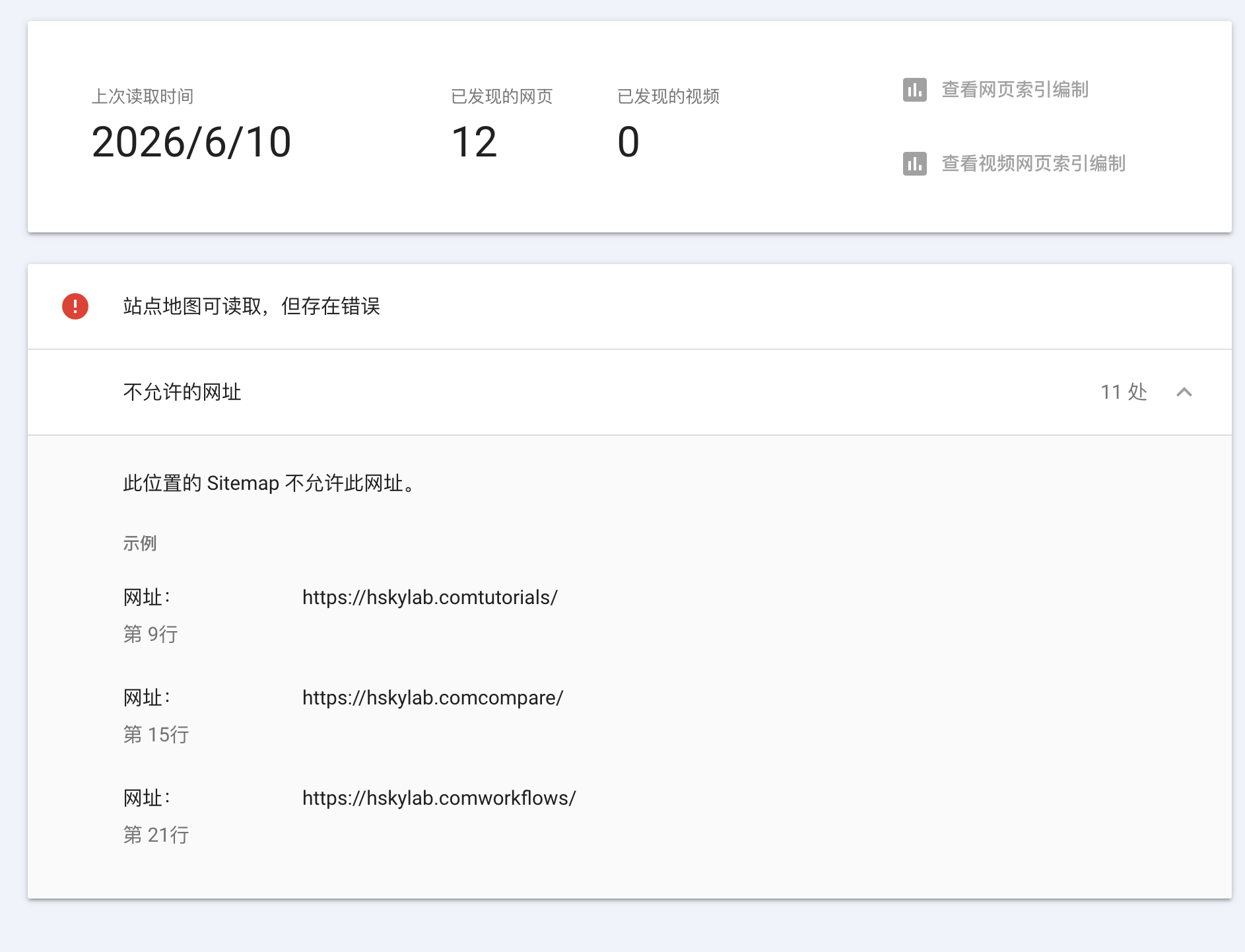
Look closely and the bug is obvious: there's no / between .com and the path. hskylab.comtutorials isn't a valid URL — it's hskylab.com and tutorials/ jammed together.
Handing It to Claude Code
I pasted the screenshot into Claude Code and asked it to fix it. No other context — just the image.
It found src/app/sitemap.ts, where every entry is built like this:
{ url: `${SITE.url}tutorials/`, ... },
{ url: `${SITE.url}compare/`, ... },
{ url: `${SITE.url}workflows/`, ... },
Then it traced SITE.url back to src/lib/constants.ts:
export const SITE = {
  url: "https://hskylab.com", // no trailing slash
  // ...
} as const;
"https://hskylab.com" + "tutorials/" = "https://hskylab.comtutorials/". That's the entire bug — a missing trailing slash on one constant, multiplied across every templated URL in the site.
The Fix
The obvious fix is adding a / inside each template string — but Claude Code pointed out that ${SITE.url} was used the same broken way in 16 places: the sitemap, the four dynamic article pages (compare/[slug], news/[slug], tutorials/[slug], workflows/[slug]), and the breadcrumb URLs in ArticleLayout.tsx.
Instead of patching 16 spots, the fix was to change the constant itself:
- url: "https://hskylab.com",
+ url: "https://hskylab.com/",
That one change fixes all 16 — but it also breaks 3 other places that were written correctly for the old (no-slash) convention, where the code already added its own leading slash:
- image: image || `${SITE.url}/images/og-default.png`,
+ image: image || `${SITE.url}images/og-default.png`,
Three lines like that, across ArticleSchema.tsx and OrganizationSchema.tsx, needed the leading slash removed so they wouldn't become https://hskylab.com//images/....
Net result: 1 constant changed, 3 small adjustments, 0 changes to the 16 broken templates.
Verifying Before Pushing
Tip
Don't trust that a one-line config change "looks right" in a diff — rebuild and inspect the actual generated output.
I ran a full production build and opened the generated sitemap.xml directly:
<url><loc>https://hskylab.com/</loc></url>
<url><loc>https://hskylab.com/tutorials/</loc></url>
<url><loc>https://hskylab.com/compare/</loc></url>
<url><loc>https://hskylab.com/workflows/</loc></url>
Every URL now has the slash in the right place. Then: commit, push, deploy.
Why This Bug Was Invisible Until Now
The site had been live for weeks with this bug, and nothing looked broken. Here's why.
Every link a visitor actually clicks — nav links, article links, footer links — is a relative path like /tutorials/, rendered through Next.js's <Link>. Those never touch SITE.url at all, so navigation worked perfectly the whole time.
SITE.url only gets concatenated into absolute URLs: the sitemap, JSON-LD structured data, canonical tags, Open Graph URLs. Those aren't things you click through during normal testing — they're things crawlers and social previews read. The bug was sitting in metadata the whole time, quietly telling Google that /tutorials/, /compare/, and /workflows/ lived at a domain that doesn't exist.
Warning
If you keep a SITE_URL / baseUrl constant, decide on a trailing-slash convention on day one and grep for every place it's concatenated with a path. TypeScript won't catch this — it's just string concatenation, and both the broken and working versions type-check fine.
What's Next
The fix is pushed. The next step is going back to Search Console and using "Validate Fix" on the sitemap, which kicks off a recrawl — that part isn't instant, so I'll know in a few days whether all 11 URLs clear.
FAQ
Why didn't this break my site's navigation or styling?
Because internal navigation uses relative paths (/tutorials/), not the SITE.url constant. Only generated absolute URLs — sitemap entries, JSON-LD, canonical and Open Graph tags — were affected. Visually, nothing was wrong.
How do I check if my own sitemap has this bug?
Visit /sitemap.xml on your site and scan for .com (or .dev, .io, etc.) immediately followed by a path segment with no / — like example.comblog/. If you find one, check how your base-URL constant is concatenated with paths.
Is this specific to Next.js?
No. Any project that keeps a base-URL constant and builds absolute URLs with string templates can hit this. The Next.js-specific part here was just where the bug lived — app/sitemap.ts and the page-level metadata.
Bottom Line
One missing character, sitting quietly in a config file, telling Google that a third of my site's URLs lived on a domain that doesn't exist. It took longer to write this post than it took Claude Code to find the bug, trace it across 19 call sites, and ship a fix that didn't break the 3 places that were already correct.